Ah those pesky little elves. Always fighting with my lawn gnomes and creating huge divets in my grass. Aside from their hatred towards little people with shovels I can say that Elves are not that bad.
Or I can say one ELF.
Now I do know they can be quite annoying sometimes but there are some good apples mixed in with the bad. Why is that Elf good!? Well let me tell you.
Question: Have you ever turned in a book late because you forgot!? Do you like me even forget his own birthday.
Well this little Elf can fix your problem right up.
What is Elf!? How do you use it!? And will it fight my lawn gnomes also!?
ELF is a website that synchs with your library's computer system. It then reminds you when your library books are due. It also gives you options on how long before the books are due and how frequent it should remind. 1 day before the books are due!? Why not! 5 day before the books are due!? Sure! Even up to a week. And it can give you frequent reminders each day so you won't forget. Want a text message sent to your cellphone!? Easy as pie.
Awesome feature and I'll be able to go fine free and not also be biased towards Gnomes.
Hop on and register. You'll be glad you did.
www.libraryelf.com
Tuesday, November 20, 2007

Sunday, October 14, 2007
Creating my own library
Avid book readers. Do you wish to create your own book collage? No!!! Well suck it up, you're definately doing one! ;)
Imagine a great book you've read before. Imagine if there was a network like myspace that connected you to people with the same tastes and ideas. Imagine... Dun.. Dun.. Dun.. Library Thing does all of that and more.
Basically if you'd like to talk to like minded people about books, plots, characters well here is an easy way to join. Also it's easy and they don't ask you to sign up with ridiculous questions. Most websites want your DNA stored in their banks.
Just type in a user name and a password to your liking. Make it something easy to remember. Once there start adding books you enjoy and like but clicking on the tab "Add Book" and just start typing in books you loved. Easy as that!
And once you're done you can make a Collage of your books and post it on blogs or anywhere you'd like. Awesome feature.
This is my masterpiece:
My Favorite Books Catalog
Basically if you'd like to talk to like minded people about books, plots, characters well here is an easy way to join. Also it's easy and they don't ask you to sign up with ridiculous questions. Most websites want your DNA stored in their banks.
Just type in a user name and a password to your liking. Make it something easy to remember. Once there start adding books you enjoy and like but clicking on the tab "Add Book" and just start typing in books you loved. Easy as that!
And once you're done you can make a Collage of your books and post it on blogs or anywhere you'd like. Awesome feature.
This is my masterpiece:
My Favorite Books Catalog
Friday, October 12, 2007
Movie Posters!
Now everyone can have a movie poster and funny to boot. Yes...yes here is the link to the site I used to make the movie poster.
FDTOYS
It's devilishly simple.
Just pick a photo of yourself or anything else. Maybe even perhaps a bunny.
Go ahead and upload it by browsing the picture and finding it. Then of course click on "open".
Now just choose a title. I'd choose.. Armageddon 2: The Bunny Destroyer.
Choose whatever goofy title fits your mood.
Then fill out the rest/pick options and voila. One wicked bunny.
I on the other hand I did "Snakes on a Ramses". Ahem:

FDTOYS
It's devilishly simple.
Just pick a photo of yourself or anything else. Maybe even perhaps a bunny.
Go ahead and upload it by browsing the picture and finding it. Then of course click on "open".
Now just choose a title. I'd choose.. Armageddon 2: The Bunny Destroyer.
Choose whatever goofy title fits your mood.
Then fill out the rest/pick options and voila. One wicked bunny.
I on the other hand I did "Snakes on a Ramses". Ahem:

RSS Feeds and More!
What are RSS feeds you say? No they are not implanted into your body for government control. They are not microchips that the government puts on dollar bills to see on what and where you spend them.
They do however "feed" you news. RSS stands for = Real Simple Syndication which means I guess that it's simple. Now how do you get ahold of an RSS? How do you go about reading news and from where?
Well most known newspaper, gaming, hardware, and software site have RSS feeds. When I mean news sites I mean The New York Post, USA Today and more. RSS is just a way for you to have only the news you ask for, syndicated to you.
You want the The Houston Chronicle no problem. The Sun Times for Britian sure. Newspaper from New Gali? Well why not.
Why an RSS, why did it come about? Well let's ask the real question is: How much is your time worth? An RSS feed let's you know that the websites you've subscribed to that it's been updated.
Hopefully this has been informational to you as it has to me! :)
They do however "feed" you news. RSS stands for = Real Simple Syndication which means I guess that it's simple. Now how do you get ahold of an RSS? How do you go about reading news and from where?
Well most known newspaper, gaming, hardware, and software site have RSS feeds. When I mean news sites I mean The New York Post, USA Today and more. RSS is just a way for you to have only the news you ask for, syndicated to you.
You want the The Houston Chronicle no problem. The Sun Times for Britian sure. Newspaper from New Gali? Well why not.
Why an RSS, why did it come about? Well let's ask the real question is: How much is your time worth? An RSS feed let's you know that the websites you've subscribed to that it's been updated.
Now to the good part. Let's talk about subscribing to your favorite website. Now hop on several of your favorite website. Look around on the front page and you should a button that looks likes this:  or this
  or even this
  .
.
There are many different way the button can look but it's the same icon or "rss" on it.
RSS can be read by a newsreader or a browser that supports RSS. Most blogs have RSS feeds you can subscribe to. I personally use Firefox since it supports RSS feeds in the browser itself.
or this or even this .There are many different way the button can look but it's the same icon or "rss" on it.
RSS can be read by a newsreader or a browser that supports RSS. Most blogs have RSS feeds you can subscribe to. I personally use Firefox since it supports RSS feeds in the browser itself.
Hopefully this has been informational to you as it has to me! :)
Thursday, October 11, 2007
Photo Editing Tools
Well I'm back posting up another blog about Photo Editing Tools! If the title didn't give it away I don't know what will :)
Now there are several online photo editing tools to do your um... photo editing. Now most of these are Photoshop Supreme or anything but it will do for resizing, cropping, color editing and more.
So here is my LOLCAT. <-- click for more info
Now there are several online photo editing tools to do your um... photo editing. Now most of these are Photoshop Supreme or anything but it will do for resizing, cropping, color editing and more.
So here is my LOLCAT. <-- click for more info
Mashup and API
Now that you've started your flickr account and have been playing around with some of the features let's talk about 3rd party aps. This is where the fun begins. With certain applications you can make a program that you thought did one and have it fit your needs.
Now if you don't know what I mean let's take FDToys website. I'll show you a card I made.
Now if you don't know what I mean let's take FDToys website. I'll show you a card I made.

This card was easy to make and pretty self explanatory. Try the FDTOYS website now.
And also head over to MASHUP for other apps!
And also head over to MASHUP for other apps!
Wednesday, October 3, 2007
Flickr Account
I like Flickr when trying to find pictures but I do rather enjoy Photobucket more when uploading pictures.
Other than Flickr (www.flickr.com) you can also use Photobucket (www.photobucket.com) for photos.
To use Flickr just sign up for the account and click on "Home". Once there you should see the "Upload Photo". Click on "Choose Photo" and find where the picture is located.
Finally click on "Upload" and give it a tag for example: "iHCPL". And here is how it will turn out:
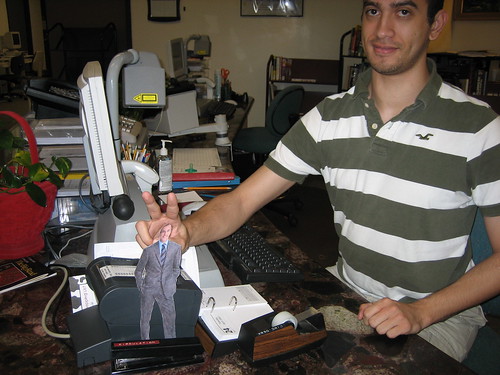
Thumbs up!
Other than Flickr (www.flickr.com) you can also use Photobucket (www.photobucket.com) for photos.
To use Flickr just sign up for the account and click on "Home". Once there you should see the "Upload Photo". Click on "Choose Photo" and find where the picture is located.
Finally click on "Upload" and give it a tag for example: "iHCPL". And here is how it will turn out:
Thumbs up!
Subscribe to:
Posts (Atom)